
"/><stop offset="1" stop-color="rgba(255, 255, 255, 0)"/></linearGradient><linearGradient id="TM93iHFXv-476374250-linear-gradient" x1="0.45215584766609684" x2="0.5478441523339032" y1="0" y2="1"><stop offset="0" stop-color="rgba(255, 255, 255, 0.4)"/><stop offset="1" stop-color="rgba(255, 255, 255, 0)"/></linearGradient><linearGradient id="KJj_uzJ0e-476374250-linear-gradient" x1="0.400443336908559" x2="0.599556663091441" y1="0" y2="1"><stop offset="0" stop-color="rgba(255, 255, 255, 0.4)"/><stop offset="1" stop-color="rgba(255, 255, 255, 0)"/></linearGradient><linearGradient id="OGBpWrQ7A-476374250-linear-gradient" x1="0.40583866002416175" x2="0.5941613399758383" y1="5.551115123125783e-17" y2="1"><stop offset="0" stop-color="rgba(255, 255, 255, 0.4)"/><stop offset="1" stop-color="rgba(255, 255, 255, 0)"/></linearGradient></defs><g d="M 118.989 216.68 C 108.245 208.312 89.389 180.496 86.452 166.864 C 85.759 163.647 87.562 158.794 90.964 159.409 C 100.701 161.171 112.767 165.177 122.126 168.072 C 151.669 177.21 181.624 181.754 212.505 182.352 C 218.069 182.456 232.144 184.469 234.308 178.249 C 234.265 176.092 233.223 174.676 231.739 173.194 C 228.527 169.985 209.482 169.001 203.906 168.34 C 166.169 163.865 86.894 150.18 63.982 117.717 C 55.795 106.118 53.527 89.806 53.143 75.95 C 53.01 71.119 52.308 62.617 55.9 58.8 C 56.723 57.925 57.491 57.736 58.601 57.5 C 59.551 57.621 60.868 58.007 61.513 58.772 C 72.671 72.036 87.161 80.264 102.009 88.697 C 111.478 94.075 121.143 97.657 131.381 101.386 C 186.793 121.569 246.164 129.394 304.948 127.825 C 366.793 126.64 428.716 122.81 487.924 102.908 C 511.3 94.574 533.839 82.688 552.713 66.401 C 555.188 64.224 559.767 57.064 563.545 57.978 C 574.986 60.748 570.683 77.889 569.199 86.226 C 564.243 114.068 551.535 137.269 530.265 155.228 C 550.876 162.672 520.432 196.082 513.652 203.979 C 502.821 216.596 490.801 228.612 476.953 237.971 C 474.228 239.811 470.086 242.65 467.77 244.694 C 451.65 253.503 437.396 263.104 419.699 268.949 C 416.785 269.912 411.439 271.823 408.739 273.134 C 364.606 287.507 312.029 291.637 266.193 284.177 C 262.349 283.551 248.752 281.438 245.495 279.972 C 241.932 278.397 229.748 275.686 224.618 273.949 C 206.926 267.956 189.444 261.008 173.216 251.664 C 171.043 250.879 164.751 247.391 162.404 246.216 C 146.149 238.079 134.04 228.932 119.808 218.09 Z M 118.989 216.68 C 108.245 208.312 89.389 180.496 86.452 166.864 C 85.759 163.647 87.562 158.794 90.964 159.409 C 100.701 161.171 112.767 165.177 122.126 168.072 C 151.669 177.21 181.624 181.754 212.505 182.352 C 218.069 182.456 232.144 184.469 234.308 178.249 C 234.265 176.092 233.223 174.676 231.739 173.194 C 228.527 169.985 209.482 169.001 203.906 168.34 C 166.169 163.865 86.894 150.18 63.982 117.717 C 55.795 106.118 53.527 89.806 53.143 75.95 C 53.01 71.119 52.308 62.617 55.9 58.8 C 56.723 57.925 57.491 57.736 58.601 57.5 C 59.551 57.621 60.868 58.007 61.513 58.772 C 72.671 72.036 87.161 80.264 102.009 88.697 C 111.478 94.075 121.143 97.657 131.381 101.386 C 186.793 121.569 246.164 129.394 304.948 127.825 C 366.793 126.64 428.716 122.81 487.924 102.908 C 511.3 94.574 533.839 82.688 552.713 66.401 C 555.188 64.224 559.767 57.064 563.545 57.978 C 574.986 60.748 570.683 77.889 569.199 86.226 C 564.243 114.068 551.535 137.269 530.265 155.228 C 550.876 162.672 520.432 196.082 513.652 203.979 C 502.821 216.596 490.801 228.612 476.953 237.971 C 474.228 239.811 470.086 242.65 467.77 244.694 C 451.65 253.503 437.396 263.104 419.699 268.949 C 416.785 269.912 411.439 271.823 408.739 273.134 C 364.606 287.507 312.029 291.637 266.193 284.177 C 262.349 283.551 248.752 281.438 245.495 279.972 C 241.932 278.397 229.748 275.686 224.618 273.949 C 206.926 267.956 189.444 261.008 173.216 251.664 C 171.043 250.879 164.751 247.391 162.404 246.216 C 146.149 238.079 134.04 228.932 119.808 218.09 Z M 115 216.051 C 121.319 214.638 160.184 222.392 169.249 223.522 C 200.263 227.579 231.551 232.213 262.904 232.489 C 267.464 232.669 272.121 233.449 276.67 233.579 C 292.561 234.034 308.488 233.743 324.383 233.678 C 329.103 233.659 355.052 230.91 354.922 237.102 C 348.477 248.031 292.41 248.074 280.167 250.606 C 277.32 251.195 270.475 251.818 267.207 252.223 C 240.378 255.543 213.681 254.55 186.936 251.175 C 183.088 250.689 172.7 249.198 169.61 249.56 C 167.422 248.808 161.085 245.467 158.721 244.342 C 142.352 236.548 130.157 227.786 115.825 217.401 Z M 515.647 153.827 C 518.329 153.566 531.061 152.837 532.465 155.036 C 522.293 160.887 514.067 166.74 502.709 170.796 C 460.247 185.959 407.635 191.019 363.227 183.941 C 355.444 182.63 347.901 181.726 340.527 178.796 C 351.603 177.094 363.413 176.102 374.777 174.354 L 443.341 163.861 C 453.405 162.221 463.971 159.547 474.081 158.371 C 487.904 156.762 501.8 155.384 515.647 153.827 Z M 77 49.275 C 114.406 12.598 232.61 1.383 283.956 0.403 C 362.254 -1.091 449.485 -0.077 522.045 33.294 C 525.777 34.984 543.191 44.361 542.425 48.85 C 539.825 64.097 515.327 76.777 502.798 82.403 C 474.78 95.135 442.706 101.734 412.598 106.565 C 332.14 119.474 248.631 118.53 169.235 99.063 C 152.103 94.863 133.214 89.241 117.306 81.428 C 103.412 74.938 84.369 63.128 77 49.275 Z M 77 49.275 C 114.406 12.598 232.61 1.383 283.956 0.403 C 362.254 -1.091 449.485 -0.077 522.045 33.294 C 525.777 34.984 543.191 44.361 542.425 48.85 C 539.825 64.097 515.327 76.777 502.798 82.403 C 474.78 95.135 442.706 101.734 412.598 106.565 C 332.14 119.474 248.631 118.53 169.235 99.063 C 152.103 94.863 133.214 89.241 117.306 81.428 C 103.412 74.938 84.369 63.128 77 49.275 Z M 120 80.422 C 127.906 75.491 146.916 69.732 156.018 66.29 C 197.811 50.48 240.064 45.153 284.283 43.595 C 338.671 41.679 395.202 43.893 448.315 57.6 C 460.892 60.855 494.616 73.252 503.876 81.42 C 475.975 94.462 444.036 101.221 414.054 106.169 C 333.934 119.392 250.774 118.426 171.711 98.485 C 154.651 94.183 135.841 88.425 120 80.422 Z M 132.617 266.059 C 111.818 268.246 95.579 268.593 75.044 264.204 C 53.017 259.754 32.694 249.893 14.454 237.189 C 4.683 230.144 -9.877 220.244 9.65 213.099 C 29.552 205.817 54.538 203.374 75.767 204.964 C 87.781 205.866 105.988 212.396 117.089 216.967 C 131.541 227.712 143.838 236.778 160.344 244.842 C 162.728 246.006 169.117 249.463 171.323 250.241 C 187.803 259.502 205.555 266.389 223.52 272.328 C 228.73 274.05 241.102 276.736 244.721 278.297 C 207.118 316.657 156.133 336.016 101.842 333.902 C 89.267 333.413 48.674 334.844 68.627 312.899 C 86.659 293.068 109.818 279.96 132.617 266.059 Z M 132.617 266.059 C 111.818 268.246 95.579 268.593 75.044 264.204 C 53.017 259.754 32.694 249.893 14.454 237.189 C 4.683 230.144 -9.877 220.244 9.65 213.099 C 29.552 205.817 54.538 203.374 75.767 204.964 C 87.781 205.866 105.988 212.396 117.089 216.967 C 131.541 227.712 143.838 236.778 160.344 244.842 C 162.728 246.006 169.117 249.463 171.323 250.241 C 187.803 259.502 205.555 266.389 223.52 272.328 C 228.73 274.05 241.102 276.736 244.721 278.297 C 207.118 316.657 156.133 336.016 101.842 333.902 C 89.267 333.413 48.674 334.844 68.627 312.899 C 86.659 293.068 109.818 279.96 132.617 266.059 Z M 467.381 242.073 C 481.398 237.97 494.785 231.817 509.839 228.762 C 544.22 221.783 582.077 226.177 614.246 240.257 C 616.499 241.243 618.235 242.857 619.132 245.11 C 619.227 252.738 602.021 262.764 596.123 266.151 C 566.645 283.081 532.795 283.016 499.963 280.69 C 507.488 288.059 536.022 316.299 536.478 325.623 C 536.533 326.751 536.297 327.906 535.585 328.814 C 534.252 330.517 531.782 331 529.75 331.057 C 523.671 331.228 516.626 328.574 510.833 326.732 C 474.609 315.208 437.427 294.693 408 270.628 C 410.716 269.311 416.094 267.392 419.025 266.426 C 436.827 260.557 451.166 250.918 467.381 242.073 Z M 467.381 242.073 C 481.398 237.97 494.785 231.817 509.839 228.762 C 544.22 221.783 582.077 226.177 614.246 240.257 C 616.499 241.243 618.235 242.857 619.132 245.11 C 619.227 252.738 602.021 262.764 596.123 266.151 C 566.645 283.081 532.795 283.016 499.963 280.69 C 507.488 288.059 536.022 316.299 536.478 325.623 C 536.533 326.751 536.297 327.906 535.585 328.814 C 534.252 330.517 531.782 331 529.75 331.057 C 523.671 331.228 516.626 328.574 510.833 326.732 C 474.609 315.208 437.427 294.693 408 270.628 C 410.716 269.311 416.094 267.392 419.025 266.426 C 436.827 260.557 451.166 250.918 467.381 242.073 Z" fill="transparent" height="334.05852918503115px" id="hGwZV5EwD" width="619.1323918287018px"><path d="M 65.989 159.18 C 55.245 150.812 36.389 122.996 33.452 109.364 C 32.759 106.147 34.562 101.294 37.964 101.909 C 47.701 103.671 59.767 107.677 69.126 110.572 C 98.669 119.71 128.624 124.254 159.505 124.852 C 165.069 124.956 179.144 126.969 181.308 120.749 C 181.265 118.592 180.223 117.176 178.739 115.694 C 175.527 112.485 156.482 111.501 150.906 110.84 C 113.169 106.365 33.894 92.68 10.982 60.217 C 2.795 48.618 0.527 32.306 0.143 18.45 C 0.01 13.619 -0.692 5.117 2.9 1.3 C 3.723 0.425 4.491 0.236 5.601 0 C 6.551 0.121 7.868 0.507 8.513 1.272 C 19.671 14.536 34.161 22.764 49.009 31.197 C 58.478 36.575 68.143 40.157 78.381 43.886 C 133.793 64.069 193.164 71.894 251.948 70.325 C 313.793 69.14 375.716 65.31 434.924 45.408 C 458.3 37.074 480.839 25.188 499.713 8.901 C 502.188 6.724 506.767 -0.436 510.545 0.478 C 521.986 3.248 517.683 20.389 516.199 28.726 C 511.243 56.568 498.535 79.769 477.265 97.728 C 497.876 105.172 467.432 138.582 460.652 146.479 C 449.821 159.096 437.801 171.112 423.953 180.471 C 421.228 182.311 417.086 185.15 414.77 187.194 C 398.65 196.003 384.396 205.604 366.699 211.449 C 363.785 212.412 358.439 214.323 355.739 215.634 C 311.606 230.007 259.029 234.137 213.193 226.677 C 209.349 226.051 195.752 223.938 192.495 222.472 C 188.932 220.897 176.748 218.186 171.618 216.449 C 153.926 210.456 136.444 203.508 120.216 194.164 C 118.043 193.379 111.751 189.891 109.404 188.716 C 93.149 180.579 81.04 171.432 66.808 160.59 Z" fill="rgb(242, 164, 30)" height="230.3244768892239px" id="dEn3THU43" transform="translate(53 57.5)" width="518.232591824303px"/><path d="M 65.989 159.18 C 55.245 150.812 36.389 122.996 33.452 109.364 C 32.759 106.147 34.562 101.294 37.964 101.909 C 47.701 103.671 59.767 107.677 69.126 110.572 C 98.669 119.71 128.624 124.254 159.505 124.852 C 165.069 124.956 179.144 126.969 181.308 120.749 C 181.265 118.592 180.223 117.176 178.739 115.694 C 175.527 112.485 156.482 111.501 150.906 110.84 C 113.169 106.365 33.894 92.68 10.982 60.217 C 2.795 48.618 0.527 32.306 0.143 18.45 C 0.01 13.619 -0.692 5.117 2.9 1.3 C 3.723 0.425 4.491 0.236 5.601 0 C 6.551 0.121 7.868 0.507 8.513 1.272 C 19.671 14.536 34.161 22.764 49.009 31.197 C 58.478 36.575 68.143 40.157 78.381 43.886 C 133.793 64.069 193.164 71.894 251.948 70.325 C 313.793 69.14 375.716 65.31 434.924 45.408 C 458.3 37.074 480.839 25.188 499.713 8.901 C 502.188 6.724 506.767 -0.436 510.545 0.478 C 521.986 3.248 517.683 20.389 516.199 28.726 C 511.243 56.568 498.535 79.769 477.265 97.728 C 497.876 105.172 467.432 138.582 460.652 146.479 C 449.821 159.096 437.801 171.112 423.953 180.471 C 421.228 182.311 417.086 185.15 414.77 187.194 C 398.65 196.003 384.396 205.604 366.699 211.449 C 363.785 212.412 358.439 214.323 355.739 215.634 C 311.606 230.007 259.029 234.137 213.193 226.677 C 209.349 226.051 195.752 223.938 192.495 222.472 C 188.932 220.897 176.748 218.186 171.618 216.449 C 153.926 210.456 136.444 203.508 120.216 194.164 C 118.043 193.379 111.751 189.891 109.404 188.716 C 93.149 180.579 81.04 171.432 66.808 160.59 Z" fill="url(%23xVP1oGQd6-476374250-linear-gradient)" height="230.3244768892239px" id="xVP1oGQd6" transform="translate(53 57.5)" width="518.232591824303px"/><path d="M 0 62.551 C 6.319 61.138 45.184 68.892 54.249 70.022 C 85.263 74.079 116.551 78.713 147.904 78.989 C 152.464 79.169 157.121 79.949 161.67 80.079 C 177.561 80.534 193.488 80.243 209.383 80.178 C 214.103 80.159 240.052 77.41 239.922 83.602 C 233.477 94.531 177.41 94.574 165.167 97.106 C 162.32 97.695 155.475 98.318 152.207 98.723 C 125.378 102.043 98.681 101.05 71.936 97.675 C 68.088 97.189 57.7 95.698 54.61 96.06 C 52.422 95.308 46.085 91.967 43.721 90.842 C 27.352 83.048 15.157 74.286 0.825 63.901 Z M 400.647 0.327 C 403.329 0.066 416.061 -0.663 417.465 1.536 C 407.293 7.387 399.067 13.24 387.709 17.296 C 345.247 32.459 292.635 37.519 248.227 30.441 C 240.444 29.13 232.901 28.226 225.527 25.296 C 236.603 23.594 248.413 22.602 259.777 20.854 L 328.341 10.361 C 338.405 8.721 348.971 6.047 359.081 4.871 C 372.904 3.262 386.8 1.884 400.647 0.327 Z" fill="rgb(218, 109, 31)" height="100.76735118876078px" id="jGnJGLCfH" transform="translate(115 153.5)" width="417.4649927978515px"/><path d="M 0 49.275 C 37.406 12.598 155.61 1.383 206.956 0.403 C 285.254 -1.091 372.485 -0.077 445.045 33.294 C 448.777 34.984 466.191 44.361 465.425 48.85 C 462.825 64.097 438.327 76.777 425.798 82.403 C 397.78 95.135 365.706 101.734 335.598 106.565 C 255.14 119.474 171.631 118.53 92.235 99.063 C 75.103 94.863 56.214 89.241 40.306 81.428 C 26.412 74.938 7.369 63.128 0 49.275 Z" fill="rgb(242, 164, 30)" height="115.16266798380902px" id="LEIK0q_P8" transform="translate(77 0)" width="465.4495125853898px"/><path d="M 0 49.275 C 37.406 12.598 155.61 1.383 206.956 0.403 C 285.254 -1.091 372.485 -0.077 445.045 33.294 C 448.777 34.984 466.191 44.361 465.425 48.85 C 462.825 64.097 438.327 76.777 425.798 82.403 C 397.78 95.135 365.706 101.734 335.598 106.565 C 255.14 119.474 171.631 118.53 92.235 99.063 C 75.103 94.863 56.214 89.241 40.306 81.428 C 26.412 74.938 7.369 63.128 0 49.275 Z" fill="url(%23TM93iHFXv-476374250-linear-gradient)" height="115.16266798380902px" id="TM93iHFXv" transform="translate(77 0)" width="465.4495125853898px"/><path d="M 0 37.422 C 7.906 32.491 26.916 26.732 36.018 23.29 C 77.811 7.48 120.064 2.153 164.283 0.595 C 218.671 -1.321 275.202 0.893 328.315 14.6 C 340.892 17.855 374.616 30.252 383.876 38.42 C 355.975 51.462 324.036 58.221 294.054 63.169 C 213.934 76.392 130.774 75.426 51.711 55.485 C 34.651 51.183 15.841 45.425 0 37.422 Z" fill="rgb(218, 109, 31)" height="71.9765796043396px" id="c_i4ARxxe" transform="translate(120 43)" width="383.876px"/><path d="M 132.617 61.559 C 111.818 63.746 95.579 64.093 75.044 59.704 C 53.017 55.254 32.694 45.393 14.454 32.689 C 4.683 25.644 -9.877 15.744 9.65 8.599 C 29.552 1.317 54.538 -1.126 75.767 0.464 C 87.781 1.366 105.988 7.896 117.089 12.467 C 131.541 23.212 143.838 32.278 160.344 40.342 C 162.728 41.506 169.117 44.963 171.323 45.741 C 187.803 55.002 205.555 61.889 223.52 67.828 C 228.73 69.55 241.102 72.236 244.721 73.797 C 207.118 112.157 156.133 131.516 101.842 129.402 C 89.267 128.913 48.674 130.344 68.627 108.399 C 86.659 88.568 109.818 75.46 132.617 61.559 Z" fill="rgb(51, 136, 91)" height="129.55852918503115px" id="JU8NCtlzs" transform="translate(0 204.5)" width="244.7209522806225px"/><path d="M 132.617 61.559 C 111.818 63.746 95.579 64.093 75.044 59.704 C 53.017 55.254 32.694 45.393 14.454 32.689 C 4.683 25.644 -9.877 15.744 9.65 8.599 C 29.552 1.317 54.538 -1.126 75.767 0.464 C 87.781 1.366 105.988 7.896 117.089 12.467 C 131.541 23.212 143.838 32.278 160.344 40.342 C 162.728 41.506 169.117 44.963 171.323 45.741 C 187.803 55.002 205.555 61.889 223.52 67.828 C 228.73 69.55 241.102 72.236 244.721 73.797 C 207.118 112.157 156.133 131.516 101.842 129.402 C 89.267 128.913 48.674 130.344 68.627 108.399 C 86.659 88.568 109.818 75.46 132.617 61.559 Z" fill="url(%23KJj_uzJ0e-476374250-linear-gradient)" height="129.55852918503115px" id="KJj_uzJ0e" transform="translate(0 204.5)" width="244.7209522806225px"/><path d="M 59.381 16.573 C 73.398 12.47 86.785 6.317 101.839 3.262 C 136.22 -3.717 174.077 0.677 206.246 14.757 C 208.499 15.743 210.235 17.357 211.132 19.61 C 211.227 27.238 194.021 37.264 188.123 40.651 C 158.645 57.581 124.795 57.516 91.963 55.19 C 99.488 62.559 128.022 90.799 128.478 100.123 C 128.533 101.251 128.297 102.406 127.585 103.314 C 126.252 105.017 123.782 105.5 121.75 105.557 C 115.671 105.728 108.626 103.074 102.833 101.232 C 66.609 89.708 29.427 69.193 0 45.128 C 2.716 43.811 8.094 41.892 11.025 40.926 C 28.827 35.057 43.166 25.418 59.381 16.573 Z" fill="rgb(51, 136, 91)" height="105.56531680469897px" id="LbSU541PG" transform="translate(408 225.5)" width="211.13239182870177px"/><path d="M 59.381 16.573 C 73.398 12.47 86.785 6.317 101.839 3.262 C 136.22 -3.717 174.077 0.677 206.246 14.757 C 208.499 15.743 210.235 17.357 211.132 19.61 C 211.227 27.238 194.021 37.264 188.123 40.651 C 158.645 57.581 124.795 57.516 91.963 55.19 C 99.488 62.559 128.022 90.799 128.478 100.123 C 128.533 101.251 128.297 102.406 127.585 103.314 C 126.252 105.017 123.782 105.5 121.75 105.557 C 115.671 105.728 108.626 103.074 102.833 101.232 C 66.609 89.708 29.427 69.193 0 45.128 C 2.716 43.811 8.094 41.892 11.025 40.926 C 28.827 35.057 43.166 25.418 59.381 16.573 Z" fill="url(%23OGBpWrQ7A-476374250-linear-gradient)" height="105.56531680469897px" id="OGBpWrQ7A" transform="translate(408 225.5)" width="211.13239182870177px"/></g></svg>)
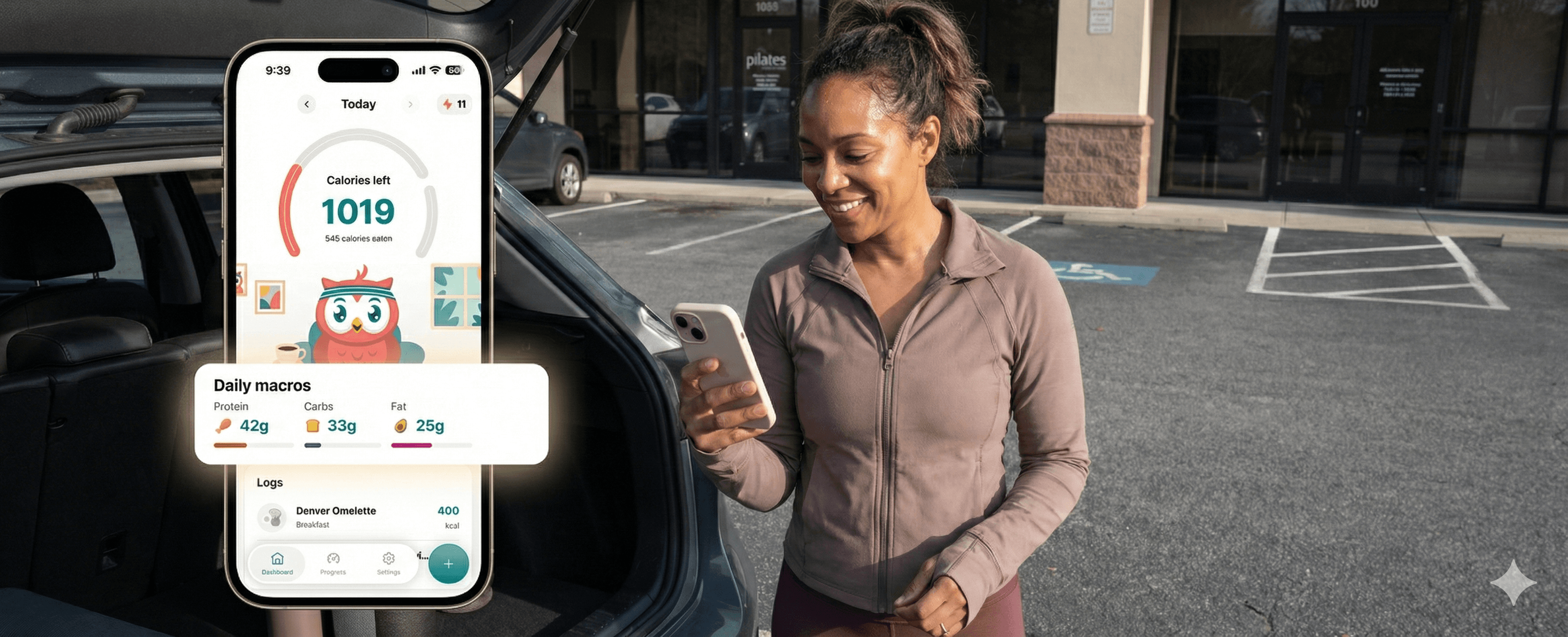

The Beginner’s Guide to Macro Tracking (Without the “Macro Math Meltdown”)
If you’ve ever opened a nutrition app, stared at the numbers, and quietly whispered, “What in the world is a macro?”—you’re in the right place.
Most beginners don’t struggle because macro tracking is impossible. They struggle because nutrition apps often hand you a spreadsheet when what you really needed was a friendly human, a clear explanation, and maybe a snack.
And because macros are, at their core, simple:
Protein helps build and maintain muscle (and keeps you full)
Fat supports hormones, brain function, and satiety
Carbs give you energy to, you know… be a person in 2025
But when you drop them into an app with charts, ratios, targets, and percentages? It can feel like you’ve enrolled in surprise biochemistry.
The good news: the right macro tracker for beginners removes that overwhelm instead of creating more of it. It handles the math, offers educated defaults, and guides you through your choices the way a supportive friend would—not like a disappointed coach tapping a clipboard.
That’s the opposite of diet culture. That’s support over shame.
In this guide, we’ll break down:
What macros actually mean (in normal-people language)
What makes macro tracking confusing for beginners
How to choose a macro tracker that works for real life
The best macro trackers for beginners (including Hoot, Cronometer, MyFitnessPal, Macrofactor, Lifesum, Lose It!, and Cal AI)
How to start tracking macros without feeling like you need a calculator app open
Let’s make macros make sense.
Learn more: Why macro calculators give you better clarity than calorie counting alone: How a Macro Calculator Works (and Why It’s Better Than Counting Calories Alone)
What Macros Are—In the Simplest Terms Possible
Macros (short for macronutrients) are the three major sources of calories your body uses for fuel:
Protein - The Strength + Repair Builder
Protein supports the systems that keep you strong and resilient. It helps build and maintain muscle, supports your immune function, and keeps you fuller after meals. It’s the macro that makes your body feel supported, steady, and capable.
Supports muscle repair, immune health, and fullness.
In Hoot, protein is prioritized because higher-protein diets preserve lean mass and support satiety.
Many beginners under-eat protein without realizing it.
Quality matters too—lean meats, fish, eggs, dairy, tofu, beans, lentils, and Greek yogurt offer strong protein sources with steady energy and better nutrient density.
More reading: A quick, clear breakdown of how much protein you actually need—without overcomplicating it: Protein Tracking Made Simple: How Much You Really Need
Fat - The Long-Lasting Fuel + Hormone Helper
Fat provides slow, steady energy and plays a major role in hormone health, brain function, and nutrient absorption. The right fats help meals feel satisfying and help your body operate smoothly—not something to avoid, but something to choose with intention.
Essential for hormones, brain function, and nutrient absorption.
Not the villain of the 90s. Not something to fear.
Healthy fats—like those from olive oil, nuts, seeds, and salmon—support heart health and help keep meals satisfying without blowing your macros.
Carbohydrates - The Fast + Reliable Energy Source
Carbs are your body’s quickest, most accessible form of fuel. They power your brain, workouts, and daily movement. Choosing higher-quality carbs can help you maintain more stable energy throughout the day.
Your body’s most accessible energy source.
Needed for thinking, moving, training, parenting, and simply being awake in a human body.
Quality matters—whole grains, fruits, legumes, and starchy veggies offer steadier energy than ultra-processed carbs and help keep you full longer.
The Macro Tracking Formula (That You Don’t Actually Need to Do Yourself)
Every gram of:
Protein = 4 calories
Carbs = 4 calories
Fat = 9 calories
Apps generally recommend a balance that fits your goals—something like 30% protein, 30% fat, 40% carbs—or personalized macro targets based on your weight, activity, and preferences.
For example, Hoot uses evidence-based defaults:
Protein: ~0.8 g per pound of body weight
Fat: ~30% of calories with minimum safety thresholds
Carbs: whatever remains (the flexible macro)
Understanding macros is one thing. Tracking them is another.
Why Macro Tracking Feels Overwhelming for Beginners
After talking to thousands of users (and watching many beginners try, quit, and try again), here are the most common reasons macro tracking feels exhausting:
1. The math feels like homework
“What percentage of my calories should be carbs?”
“How many grams is that?”
“Why do apps expect me to know this?”
A good macro tracker should do the math for you.
2. Food logging can feel slow and technical
Traditional apps require:
Finding the exact entry in a giant database
Choosing portion sizes
Editing numbers
Repeating the whole thing for sauces, toppings, and sides
Beginners often quit here—not because they lack motivation, but because the system is too heavy.
Hoot, for example, removes the tedium by allowing users to log with text, photo, barcode, or label—letting AI handle the math.
3. People don’t know what their targets should be
Should you eat higher protein? Lower carb? Balanced?
Should you prioritize calories first? Macros first?
A beginner-friendly app simplifies these decisions rather than dumping you in settings and saying “good luck.”
4. Perfectionism creeps in
Many people fall into the trap of believing macro tracking only “counts” if it’s exact.
Spoiler: accuracy is a spectrum.
Consistency beats precision. Always.
5. Most apps weren’t designed for real life
Busy parents, shift workers, students, GLP-1 users, and anyone living a non-spreadsheet existence need something flexible and forgiving.
Apps should fit into your life—not the other way around.
What a Beginner-Friendly Macro Tracker Should Actually Do
When you’re just starting out, the best macro tracker isn’t the one with the most features—it’s the one you’ll actually stick with.
Look for apps that do the following:
1. Reduce the math
Your app should calculate:
Your calories
Your macro targets
Your percentages
Your daily progress
And update them automatically.
(If you’re calculating macros in a separate Google Sheet, that’s a sign your app isn’t beginner-friendly.)
2. Make logging effortless
Logging should take 5–10 seconds, not five minutes.
Look for features like:
Photo logging
Barcode scanning
Natural-language logging
Favorites
Smart database curation
AI-generated estimates
Hoot, for example, handles text (“chicken burrito with salsa”) like a conversation—no scrolling required.
3. Offer clear, supportive feedback—not shame
Beginner-friendly apps avoid red warning numbers and guilt-driven alerts.
Instead, they offer:
Encouraging nudges
Simple insights
Meal quality cues
Hoot uses “Guidance without guilt” as a core philosophy.
4. Set realistic, evidence-based macro targets
Apps should follow the science—not trends.
For example:
Protein around 0.7–1.0 g/lb is research-supported for satiety and muscle health.
Fat shouldn’t fall below essential minimums.
Carbs should remain flexible.
Hoot’s defaults reflect these principles.
5. Adapt to your goals
Lose, maintain, gain—your app should personalize your plan.
Hoot adjusts calories using the gold-standard Mifflin–St Jeor equation and applies safe minimums (1,200 kcal for women, 1,500 for men).
6. Make patterns visible at a glance
You should be able to say:
“Oh, this is why I’m hungry at night.”
“I’m consistently low on protein.”
“My weekend eating is throwing off my weekly average.”
Macro tracking is really pattern tracking.
Great apps shine a light on those patterns without judgment.
7. Celebrate consistency over perfection
Streaks, milestones, visual progress—they all reinforce habit loops.
Hoot uses behavioral psychology and streaks to create momentum.
The Best Macro Trackers for Beginners (2026 Edition)
Here’s how today’s most popular macro-tracking apps stack up for true beginners—people who want clarity, not complexity.
1. Hoot — Best Overall for Beginners Who Want Simple, Supportive Macro Tracking
Why it works for beginners:
Hoot is intentionally designed for people who feel overwhelmed by traditional calorie and macro tracking. Instead of a spreadsheet-style UI, it feels like chatting with a helpful friend who’s great at nutrition. Logging is fast, the feedback is supportive, and the numbers are science-backed without being scary.
Beginner-friendly benefits:
Effortless logging: text, voice, photo, barcode, or label—AI does the math.
Nutrition Score: shows meal quality at a glance.
Simple, evidence-based macro targets: protein first, fat second, carbs last.
Guidance without guilt: no shaming red numbers.
Great for macro newbies: the app explains patterns as you track.
Flexible precision: rough estimates or exact macros—both welcome.
Who it’s perfect for:
Beginners who want clarity, calm, and consistency rather than strict dieting.
People who value supportive nudges over macro micromanagement.
2. Cronometer — Best for Beginners Who Want Nutrient Depth
Why people love it:
Cronometer provides incredibly detailed micronutrient data, making it ideal for those who want to see the full nutritional breakdown beyond macros.
Pros
Highly accurate food database
Deep vitamins/minerals tracking
Customizable macro targets
Cons
Interface feels more technical
Might overwhelm someone who wants simplicity
Best for:
Data-loving beginners who appreciate precision.
Discover: Simple, intuitive trackers for people who find Cronometer too detailed: Cronometer Alternatives: Find the Best Fit for Your Tracking Style
3. MyFitnessPal — Best for Familiarity and Large Database
Why it’s popular:
One of the largest food databases in the world, with years of user-generated entries.
Pros
Massive database
Barcode scanner
Community features
Cons
Database can be inconsistent
Ads and upsells if using free tier
Logging can feel tedious compared to modern AI-native apps
Best for:
People who want familiarity or community support.
More reading: Modern, ad-free alternatives to MyFitnessPal designed for busy, real-life tracking: Best MyFitnessPal Alternatives: Simple, Smart, and Fun Food-Tracking Apps for Busy Pros
4. Macrofactor — Best for Beginners Who Love Numbers (But Want Them Simplified)
Why people love it:
Macrofactor uses adaptive algorithms to adjust your calorie budget over time based on your weight trends.
Pros
Science-forward design
Dynamic calorie estimates
Clean interface
Cons
More technical than average beginner might prefer
Less intuitive logging than newer AI-native apps
Best for:
Beginners who are analytical and enjoy data-driven feedback.
Explore: Beginner-friendly alternatives that make nutrition tracking faster and easier than Macrofactor: 9 Best Macrofactor Alternatives for Smarter, Simpler Nutrition Tracking
5. Lifesum — Best for Beginners Who Want a Visual, Lifestyle-Oriented App
Why people like it:
Lifesum leans into aesthetics and habit-building, offering meal ideas, food ratings, and playful visuals.
Pros
Beautiful interface
Diet-style guidance (Mediterranean, high protein, etc.)
Easy daily logging
Cons
Less precise macro customization
Some features behind premium
Best for:
Beginners who want vibes + tracking.
Explore: Apps with Lifesum-level style but clearer guidance and easier logging: Best Lifesum Alternatives: Smarter Food Tracking Apps
6. Lose It! — Best for Simple Logging on a Traditional Tracker
Lose It! has been around for years and offers a clean, straightforward interface.
Pros
Easy entry
Barcode scanning
Straightforward macro goals
Cons
Less educational than newer apps
Database accuracy varies
Best for:
Beginners who want a lightweight, no-frills macro tracker.
More reading: Modern apps with quicker logging and more supportive feedback than Lose It!: Best Lose It! Alternatives: Faster Logging, Smarter Feedback
7. Cal AI — Best for AI-Forward Beginners Comfortable With Automation
A newer AI-driven food logging app that focuses on automation and simplified tracking.
Pros
AI-powered estimates
Simple logging
Modern interface
Cons
Still maturing feature set
Some AI estimates require user correction
Best for:
Beginners who want automation above all else.
Learn more: Smarter, more insight-driven alternatives to Cal AI: Best Cal AI Alternatives for Smarter Calorie Tracking
How to Start Tracking Macros as a Beginner (Without Burnout)
Macro tracking doesn’t require perfection—just awareness.
Here’s the simplest way to start:
Step 1: Focus on calories + protein for the first week
Most beginners try to track everything on day one and burn out by day three.
Instead:
Log your meals.
Get used to the rhythm.
Aim for your protein target.
App-generated protein targets (like Hoot’s ~0.8 g/lb default) make this easier.
Step 2: Add carbs and fat in once logging feels automatic
Once you understand portion patterns, you can start glancing at your carb and fat distribution.
Think of macros like layers:
Calories
Protein
Fat
Carbs
You don’t need to master all four on day one.
Step 3: Log in the fastest way possible
Make logging frictionless so you can stay consistent.
Examples:
Snap a photo before eating
Voice-log “turkey sandwich with cheddar and mustard”
Use text entry
Reuse favorites
This is where Hoot’s “You eat. We do the math.” approach shines.
Step 4: Look for patterns, not perfection
Ask yourself:
Am I low on protein most days?
Are weekends a big swing?
Do I under-eat during the day and overeat at night?
This is where apps with meal-quality insights help.
Hoot’s Nutrition Score explains why a meal was high or low quality—without judgment.
Step 5: Build streaks, not strictness
Tiny wins → big change.
Staying consistent 5 days a week beats being perfect for one.
Apps that reinforce streaks and momentum (like Hoot) support this habit loop.
Beginner Macro Tracking Cheat Sheet
General Macro Targets
Protein: ~0.7–1.0 g per pound of body weight
Fat: 25–35% of total calories
Carbs: everything else
Beginner Priorities
Log consistently
Hit protein
Stay aware of calories
Adjust carbs/fat around your lifestyle
Most forgiving logging method:
Whatever is fastest for you.
A Simple Way Forward (No Math Anxiety Required)
Macro tracking doesn’t have to feel like a second job. Once you focus on the basics—logging in the easiest way possible, aiming for enough protein, and paying attention to patterns—you’re already doing the hard part. The goal isn’t to hit perfect numbers; it’s to build a little more awareness each day.
Let the process be flexible. Estimate when you need to. Log however feels fastest. Notice what helps you feel energized and satisfied. When you take the pressure off, macro tracking becomes far less about rules and far more about understanding your own habits.
Stay consistent, stay curious, and keep it light. Small steps add up quickly when you’re not weighed down by perfectionism—and that’s where real progress comes from.
FAQs about Macro Tracking
1. Do I need to weigh my food to track macros?
No. You can start with simple estimates—hand portions, visual cues, and photos. Research shows that awareness matters far more than perfect precision for most goals. Weighing food is optional and usually only helpful for athletes, bodybuilders, or people with highly specific goals. Most beginners do best when logging feels fast and sustainable.
2. Should I care more about calories or macros?
Start with calories and protein. Calories determine weight change; protein supports muscle, satiety, and stable energy. Once those feel easy, you can explore carb and fat distribution. Think of it like building a house: calories are the foundation, protein is the frame, and carbs/fat are the décor.
3. Is macro tracking safe?
Yes—when done with realistic calorie targets and without extreme restriction. Apps like Hoot use evidence-based formulas (including the Mifflin–St Jeor equation) and enforce safe minimum calories to prevent under-eating.
If you have medical conditions, check in with your clinician before making major changes.
4. I’m terrible at math. Can I still track macros?
Absolutely. Modern macro trackers do every calculation for you—targets, percentages, daily totals. Tools like Hoot even break down meals automatically through AI logging so you don’t have to manually add anything.
You bring the food; the app brings the math.
5. What if I can’t hit my protein goal?
Most beginners fall short at first. Instead of doubling your intake overnight, aim for small shifts—adding protein at breakfast, choosing a higher-protein snack, or increasing the portion of protein in one meal. Over time, this naturally improves fullness and lean-mass retention without feeling forced.
6. Are carbs bad?
No. Carbs are your body’s preferred energy source and help fuel workouts, brain function, and daily movement. The goal of macro tracking isn’t to “avoid carbs”; it’s to find a balance that fits your body, activity level, and preferences. Many beginners discover they feel better when carbs are included intentionally.
7. Do I need to hit every macro perfectly?
Not at all. Macros are targets, not grades. Think of them like a dimmer switch—close enough is good enough. Being within a reasonable range most days is far more effective (and sustainable) than hitting exact numbers.
8. How long before macro tracking feels natural?
Most people need 1–2 weeks to find their rhythm. The first few days feel clunky because you’re learning a new skill. Then your patterns emerge, your favorites get saved, and logging becomes second nature—especially with app features like photo logging or one-tap reuse.
9. Should I use a food scale?
Only if you want to. A scale offers precision, but precision isn’t required for progress. Many beginners develop accurate “portion intuition” just by logging consistently. If you ever hit a plateau and want more accuracy, you can introduce a scale temporarily.
10. Is it better to log before or after eating?
Either works. Pre-logging can help with mindfulness (“Do I really want this portion?”), while post-logging is more convenient for busy schedules. Some people snap a quick photo, eat, then log later—which is exactly why photo logging exists.
11. Why does my protein target seem high?
Because most people underestimate how much protein supports fullness, muscle retention, and metabolic health. Modern research shows that ~0.7–1.0 grams per pound of body weight helps preserve lean mass during weight changes and regulates appetite. Hitting this target feels unfamiliar at first, but becomes easier with small daily wins.
12. What if my macros don’t add up at the end of the day?
Welcome to being human. Your day won’t divide neatly into percentages—and that’s okay. The purpose of macro tracking is pattern recognition, not perfection. One day won’t make or break anything; your weekly average matters far more.
13. Can I track macros if I eat out a lot?
Yes. Restaurant meals are estimates for everyone—even dietitians. You can log the closest match, describe the meal, or use a photo-based estimate. Imperfect tracking still builds awareness and helps you make informed choices over time.
14. Do GLP-1 users need different macro priorities?
Often, yes. Appetite suppression can make it harder to hit protein and hydration goals, which are essential for protecting muscle mass and maintaining energy. Hoot supports this by highlighting protein, fiber, and water as key targets for GLP-1 users.
15. What’s a good macro ratio for weight loss?
There’s no single perfect ratio. Many people thrive with higher protein (for fullness) and a balance of carbs and fats that feel sustainable. A common starting point is something like 30% protein, 30% fat, 40% carbs—then adjusting based on hunger, workouts, and lifestyle.
16. What if I forget to log meals?
It happens to everyone. Choose an app that allows backdating so you can log “yesterday’s lunch” without breaking momentum. Hoot supports this flexible, real-life approach—because missing one log shouldn’t derail your streak.
17. Is macro tracking a diet?
No. Macro tracking is awareness, not restriction. You’re not following a list of “allowed” foods—you’re understanding your intake and making informed choices. It can support any eating pattern: Mediterranean, plant-based, high-protein, low-carb, or simply “balanced.”
18. Should beginners avoid “cheat days”?
Instead of labeling foods as “good,” “bad,” or “cheats,” view your eating as a weekly pattern. Track what you eat—even indulgent meals—because they provide valuable context and help prevent all-or-nothing thinking. Logging a special meal without judgment builds resilience, not guilt.
19. Can macro tracking improve energy levels?
Yes. Many people notice more stable energy when they increase protein and adjust carbs around their activity level. Under-eating or inconsistent carb intake can lead to energy crashes. Macro tracking helps you spot gaps—like low breakfast protein or long gaps between meals—so you can fuel more evenly.
20. What’s the easiest macro to start improving?
Protein. It has the biggest impact on fullness, body composition, and appetite regulation. Start by improving protein at one meal—breakfast is often the biggest game-changer—then build from there.
Ready for the easiest-to-use calorie tracking app? Try Hoot for free!
Disclaimer: This article is for informational and educational purposes only. It is not medical advice. Always consult a qualified healthcare provider or registered dietitian before making significant changes to your diet, exercise, or weight-loss plan.